Azure continues to make strides in improving DNS management, and one of its latest innovations for Private DNS zones is the “Internet Fallback” feature. This new capability bridges the gap between private and public DNS resolution, making DNS management more resilient and efficient. Let’s explore how this feature works, its use cases, and a practical lab scenario to demonstrate its power.
What is Internet Fallback?
The Internet Fallback feature in Azure Private DNS zones provides a streamlined DNS resolution process. If a DNS record is not found in your Private DNS zone, rather than returning an “NXDomain” error, the system gracefully attempts to resolve the query using public DNS servers. This ensures uninterrupted connectivity for resources, enhancing both application uptime and overall system resilience.
By implementing Internet Fallback, enterprises can take a significant step toward simplifying DNS configurations and ensuring seamless accessibility, even in hybrid or split-DNS scenarios.
Benefits of Private DNS Zones with Internet Fallback
Private DNS zones are essential for managing name resolution for resources within private virtual networks. With Internet Fallback, their utility expands even further:
Benefits of Private DNS Zones with Internet Fallback
- Streamlined Hybrid-Cloud Operations: Split-brain DNS, hybrid environments, and private/public endpoints all become easier to manage.
- Improved Accessibility: Public DNS servers serve as a backup resolver, ensuring that DNS queries aren’t hindered by incomplete private configurations.
- Reduced Administrative Overhead: You only need to define private DNS records for internal resources that differ from their public counterparts. Public DNS takes care of the rest.
Common Use Cases for Internet Fallback
1. Corporate Split-Brain DNS
Organizations often serve different DNS records to internal and external users. For instance, an internal audience might access a private resource for a corporate website while external users are directed to a public version. Previously, maintaining separate sets of internal and external DNS records could be a challenging, manual process. With Internet Fallback, only internal variances require private records, while undefined queries seamlessly fall back to publicly available ones.
2. Managing Virtual Machines
Managing DNS for environments with numerous Virtual Machines (VMs) across multiple regions often poses significant challenges. DNS-based lookup using FQDNs (Fully Qualified Domain Names) is the preferred approach when compared to tracking IP addresses manually. Using Internet Fallback allows VMs’ DNS queries to default to public DNS zones if matching private DNS records are unavailable. This ensures reliable name resolution, both inside and outside the virtual network environment.
3. Custom Private Link Services
For applications that leverage both public and Private Link endpoints, Internet Fallback is particularly valuable. If a DNS record is unavailable in the private DNS zone, the query automatically resolves to its public counterpart, enabling seamless hybrid or multi-tenant setups. This is especially useful when collaborating with external partners who may also rely on private endpoints.
Internet Fallback in Action: Virtual Machine Lab Scenario
To demonstrate the power of Internet Fallback, consider the following practical setup:
Lab Overview:
In this lab, we implement a split-brain DNS for a Virtual Machine (VM) named testvm, ensuring resilient DNS resolution between private and public IPs. The goal is to have the DNS query resolve to either the private or public IP, depending on the source of the query.
Steps:
1. Private DNS Zone Configuration:
- I created a DNS zone,
testdomain.cloudsnippets.net, in Azure.
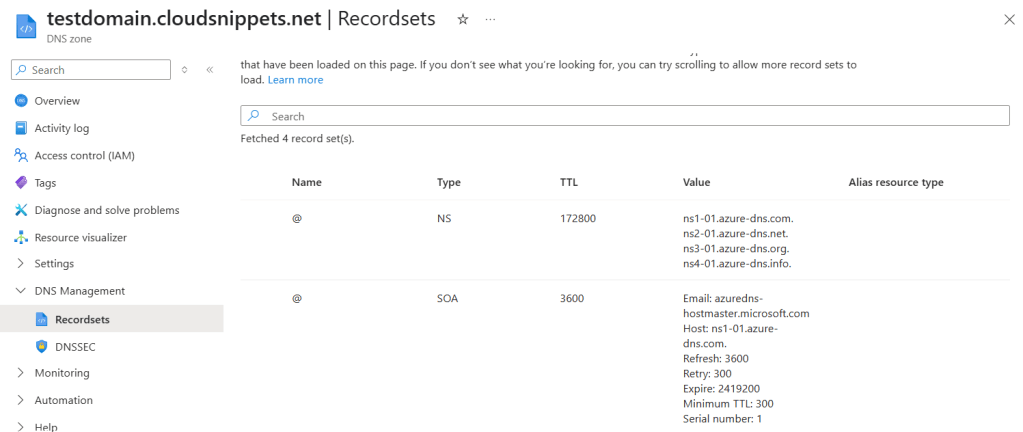
- Configured the
NSrecord in the public DNS zone to point to Azure-provided nameservers.

2. VM Creation
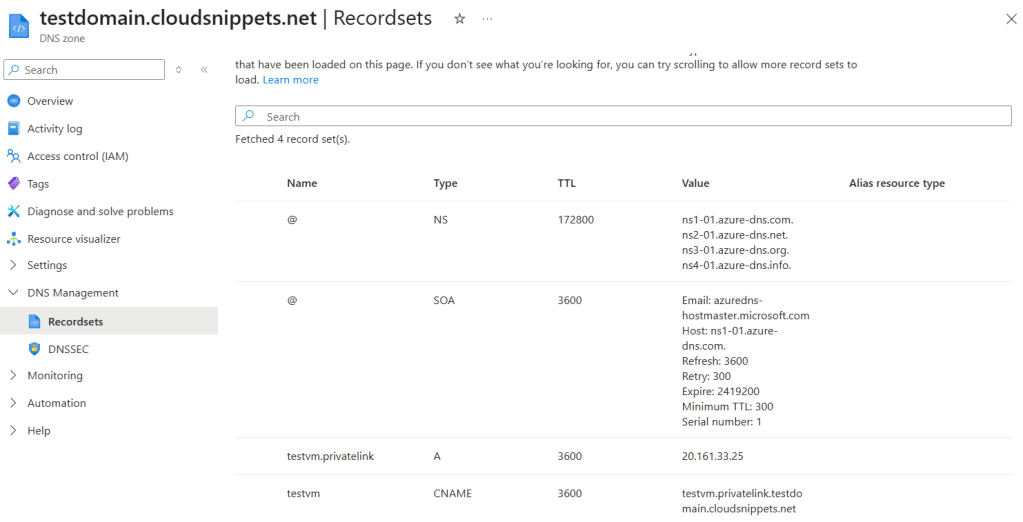
Added a VM named testvm with a public IP (20.161.33.25) and an internal private IP (10.0.0.4).
To enable split-brain DNS, created:
An A record pointing to the public IP: testvm.privatelink.testdomain.cloudsnippets.net.
A CNAME record pointing to a private DNS record: privatelink.testdomain.cloudsnippets.net.
Note: Using the
.privatelinksuffix is essential for the Internet Fallback feature to function correctly.
3. Private DNS Zone Linking:
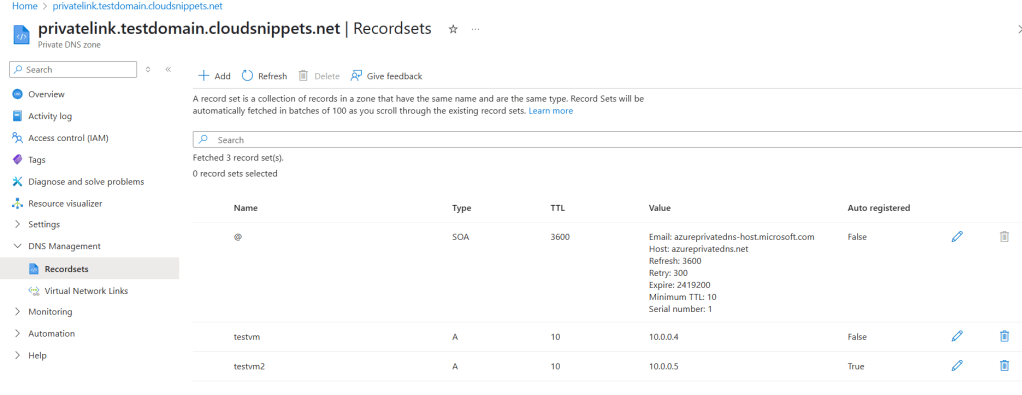
- A private DNS zone was created and linked to the VM’s Virtual Network.
- This private DNS zone contains a record for the VM (testvm) pointing to its private IP (10.0.0.4).
4. Adding a Second VM:
- Added another VM, testvm2, with the private IP (10.0.0.5) for testing.
- Ensured the private DNS zone was properly linked to both VMs’ virtual networks.
5. Enabling the Fallback Option:
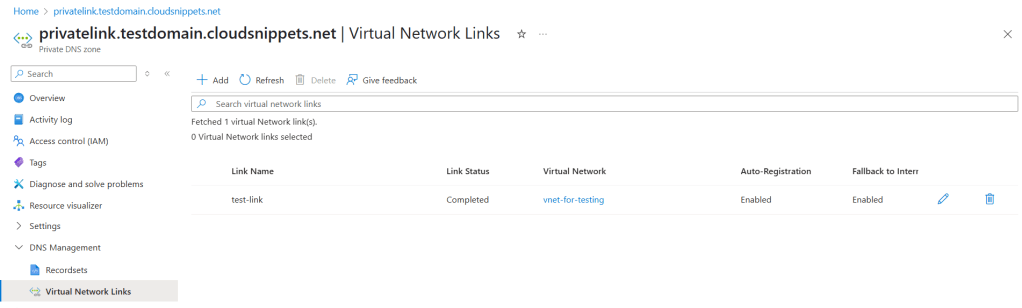
- Enabled the Internet Fallback feature for the linked private DNS zone.
- Verified that DNS queries resolve seamlessly via public or private DNS as required.
Testing the Setup
- Public Query Resolution: Running a query for
testvm.privatelink.testdomain.cloudsnippets.netfrom the public internet resolves to the VM’s public IP (20.161.33.25).
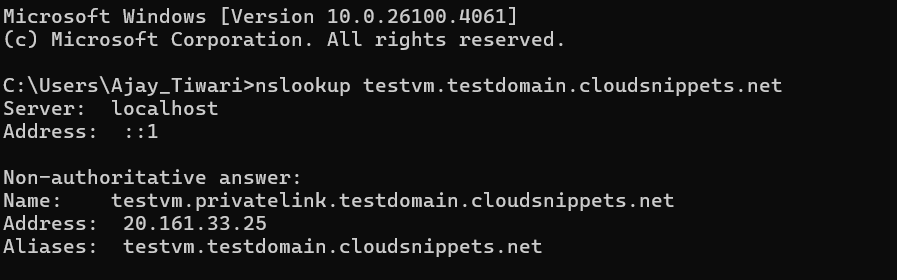
- Private Query Resolution: From testvm2, located in the same virtual network, querying the same domain resolves to the private IP (10.0.0.4) of testvm due to the configuration in the private DNS zone.
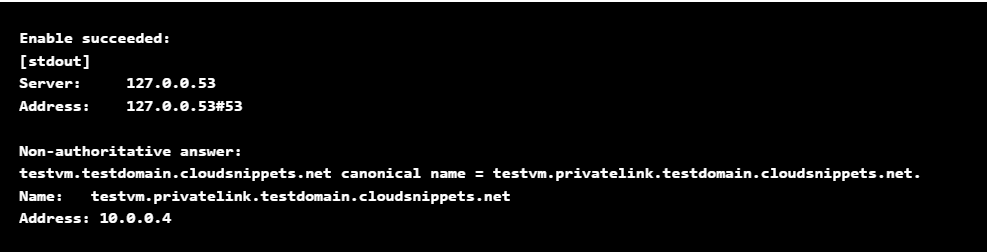
This simple yet powerful setup showcases how the Internet Fallback option automatically bridges gaps in private DNS configuration by redirecting unresolved private queries to public DNS, ensuring consistent operations.
 Site Title